I am unable to access the web application that is under OpenZiti, despite my device being enrolled, while other enrolled devices can access the app without issue. What could be causing this access problem?
While the identity ansh-mobile can access the web app using the custom address but ansh-desktop cant access the webapp. I have made sure that ziti desktop edge is on, on the desktop.
If you do need any other Information, pls do let me know
Both identities are using the same router, and same service. Service policies and service router policies are setup correctly. other Desktop identities can access in my private network, but only my desktop can’t, even my mobile identity can access the webapp. I also reinstalled Ziti desktop client.
For this no logs are showing up, Because it is not even creating a dial event.
On the Desktop machine does the name resolution work?
nslookup wazuh.ii.lan # do you get an unexptected IP?
nslookup wazuh.ii.lan 100.64.0.2 # or whatever the overlay IP address of the OpenZiti DNS is
ping wazuh.ii.lan
He can access the service but i can’t. Main thing is, It was working all fine, until about 3 days ago it stopped working, i also restarted controller and router, but still same issue.
Even tried Re enrolling my deskstop Identity without MFA (Just in case), Even in logs it now says my Identity is Active, Theoretically This should work and it was working 5 days before and RN it is not working.
The logs that you've shared so far aren't sufficient. They don't show any sort of error that would indicate a problem. Can you make sure the problem identity has the ability to dial the service?
Using your ziti cli run a policy-advisor command:
ziti edge policy-advisor identites -q
Let's first clarify that ansh-desktop has dial privs to the service that provides wazuh.ii.lan.
You cannot use nslookup without providing the dns nameserver ip. The ZDEW uses the windows NRPT and nslookup is not aware of the NRPT. You can however use powershell's Resolve-DnsName command. for example:
Resolve-DnsName mattermost.tools.netfoundry.io

Name                                           Type   TTL   Section    IPAddress
----                                           ----   ---   -------    ---------
mattermost.tools.netfoundry.io                 A      60    Answer     100.100.0.10
My guess right now since you show 1 service is that your identity has bind priviliges but not dial. Show the ziti cli command results and let's verify dial privs
I expect that ansh-desktop is online at the time you ran that Resolve-DnsName and that the identity is enabled.. Have you had a look through the logs at all? If you want to do a Main Menu->Feedback and send me that zip file here via DM i can have a look.
Right now, my guess is that there's something "busted" in Windows. We've actually seen that before when supporting NetFoundry customers. "Fixing" windows through the usual dsim and sfc commands can often fix the issue.
On that failed machine, try an nslookup directly to the tunneler too:
nslookup wazuh.ii.lan 100.64.0.2
Another thing to look out for are endpoint monitoring software, competing VPN clients and sometimes the network provider itself. Looking at your friend's resopnse i see 192.168.5.11. That's an exceptionally strange IP for that address. Has that user changed the IP range of their TUN device in Main Menu -> Advanced Settings -> Tunnel Config???
There's something new/strange going on here that isn't what I normally see so it seems like maybe that might be related?
It'd be helpful if you can send me a feedback zip file to look at.
Yes ansh-desktop is online during the time i ran resolve dns command and identity is also enabled.
If you dont mind, can you provide email address, so that i can send the log zip file.
sure. you can send to clint at openziti.org or if you want to DM here on discourse you should be able to send a zip. that nslookup seems odd too. do you know if your other friend changed the tun address to 192.168.x.x?
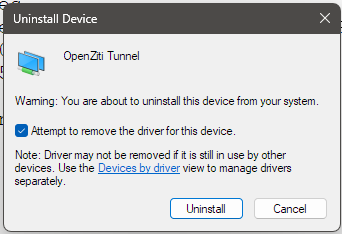
Let's do this, can you open device manager and go to network adapters and can you show me all the adapters you have listed? Do you possibly have TWO in there?
Do you know what fixed it? was it 'fixing' windows? was it multiple network interfaces/removing the driver? I'm curious to know 'how' it went wrong, if you know





 Have you had a look through the logs at all? If you want to do a Main Menu->Feedback and send me that zip file here via DM i can have a look.