Unable to login to ZAC using Entra (Ext-JWT-Signer)

Hi guys,
I am new to OpenZiti and so far it looks promsing.

Controller: v1.6.7

ZAC: 3.12.5

While trying to connect to ZAC to our SSO solution (Entra), everything in the configuration looks perfect but I am unable to logs in.

The error I recive in the UI is:
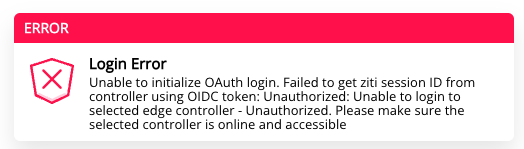
When looking on Ziti’s logs:

{"file":"github.com/openziti/ziti/controller/model/authenticator_mod_ext_jwt.go:285","func":"github.com/openziti/ziti/controller/model.(*AuthModuleExtJwt).pubKeyLookup","issuer":"https://sts.windows.net/<tenant-id-censored>/","kid":"HS23b7Do7TcaU1RoLHwpIq24VYg","knownIssuers":["https://login.microsoftonline.com/<tenant-id-censored>/v2.0","https://login.microsoftonline.com/<tenant-id-censored>/v2.0","https://login.microsoftonline.com/<tenant-id-censored>/v2.0"],"level":"error","method":"ext-jwt","msg":"issuer not found, issuers are bit-for-bit compared, they must match exactly","time":"2025-10-09T16:47:14.469Z"} {"authMethod":"ext-jwt","file":"``github.com/openziti/ziti/controller/model/authenticator_mod_ext_jwt.go:422","func":"github.com/openziti/ziti/controller/model.(*AuthModuleExtJwt).process","level":"error","msg":"encountered`` 1 candidate JWTs and all failed to validate for primary authentication, see the following log messages","time":"2025-10-09T16:47:14.469Z"} {"authMethod":"ext-jwt","error":"jwt failed to parse: token is unverifiable: error while executing keyfunc: INVALID_AUTH: The authentication request failed","expectedAudience":"","file":"github.com/openziti/ziti/controller/model/authenticator_mod_ext_jwt.go:88","func":"github.com/openziti/ziti/controller/model.(*candidateResult).LogResult","issuer":"","level":"error","msg":"failed to validate candidate JWT at index 0","time":"2025-10-09T16:47:14.469Z","tokenAudiences":""}

I looked at other posts and verified that the user must to be an admin (it is) and I also ran:

ziti ops verify ext-jwt-signer oidc --controller-url https://myctrl.mydomain.com/ Entra --authenticate

The response is looking as it should (I think :sweat_smile: ):

INFO    using supplied redirect url: http://localhost:20314/auth/callback
INFO    found external JWT signer
INFO      - issuer: https://login.microsoftonline.com/<tenant-id-censored>/v2.0
INFO      - clientId: <client-id-censored>
INFO    supplied issuer matches discovered issuer: https://login.microsoftonline.com/<tenant-id-censored>/v2.0

Any idea what I am been missing as it does not look like something related to Auth_policy or JWT_signer configuration..

Thanks!

Hi @NullZiti, welcome to the community and to OpenZiti!

This error stands out to me. It makes me think that perhaps the jwks uri is incorrect.

You shared the first parts from the ziti ops verify command but you didn't share the final part.

Do you get a "login succeeded"?

INFO    attempting to authenticate to controller with specified target token type: ACCESS
Token: xxxxxxxx
INFO    login succeeded

If you get login succeeded, then the next thing would be to have a look at the ZAC in developer tools -> console to see if there's anything wrong listed in there. Perhaps the user you are logging in with is NOT marked as an admin? That's really easy to miss as it's under the 'Show More Options' and is a toggle:

My guess though is that the jwks uri is somehow wrong since the controller can't connect and verify the token. (that's what it looks like to me)

seems like issuer mismatch -- this what comes in JWT:

Hi,

Thanks for the quick response!

@TheLumberjack yes, he is admin.
As for the rest of the message - it failed becuased it is looking for localhost:20314 - which is irrelevent when log in to ZAC

@ekoby you are right but it is not what openid-configuration holds nor what I assigned so I am not sure where it comes from.

The full JWT signer configuration is the following:

Issuer: https://login.microsoftonline.com/aaaaaaaa-0000-0000-0000-aaaaaaaaaaaa/v2.0
Audience: api://bbbbbbbb-0000-0000-0000-bbbbbbbbbbbb
Claims Property: upn
Use External ID: Yes
Client ID: bbbbbbbb-0000-0000-0000-bbbbbbbbbbbb
External Auth Url: https://login.microsoftonline.com/aaaaaaaa-0000-0000-0000-aaaaaaaaaaaa/v2.0
SCOPES: openid
Target token type: Access
JWKS Endpoint: https://login.microsoftonline.com/aaaaaaaa-0000-0000-0000-aaaaaaaaaaaa/discovery/v2.0/keys

I also added the required callback URI for the authentication test, and it now returns a different error code from the login page:

And last, the error log from the docker:

{"authMethod":"ext-jwt","file":"github.com/openziti/ziti/controller/model/authenticator_mod_ext_jwt.go:422","func":"github.com/openziti/ziti/controller/model.(*AuthModuleExtJwt).process","level":"error","msg":"encountered 1 candidate JWTs and all failed to validate for primary authentication, see the following log messages","time":"2025-10-09T20:59:51.138Z"} {"authMethod":"ext-jwt","error":"jwt failed to parse: token signature is invalid: crypto/rsa: verification error","expectedAudience":"","file":"github.com/openziti/ziti/controller/model/authenticator_mod_ext_jwt.go:88","func":"github.com/openziti/ziti/controller/model.(*candidateResult).LogResult","issuer":"","level":"error","msg":"failed to validate candidate JWT at index 0","time":"2025-10-09T20:59:51.139Z","tokenAudiences":""}

Thanks again for the support!

Yah, you need to enable the localhost:20314 redirect. Enable that and use the ziti CLI to test. It will show you your id, auth, and refresh token bodies which will help you figure the issue out better. You'll also need it if you want to add identities via url and use ext-jwt-signers for tunnelers.

Also, make sure the identity you have an external identity mapped to uses the default auth policy for now.

This is going to be difficult to figure out. I've seen this happen when the jwks uri is incorrect and when the idp being connected to is not trusted.

I still think using the ziti CLI verify command will help you. But that's just my opinion :slight_smile:

Are you reffering to auth callback for tunnelers in Entra (http://localhost:20314/auth/callback)?
If so, it is not clear from the documentation how to enable both (ZAC & Tunnerlers) at the same time under the same application but I will try.

Yes. That page shows the tunneler url in the screenshot and this page generically talks about tunnelers Configuring OIDC | NetFoundry Documentation

To enable both at the same time, you just need to add the two different redirect urls. One for ZAC and one for tunnelers

cap from the entra docs (all of the idps tbh)